How To Use This Site
Types of Information Provided
This page provides detailed information about the use of ABS Consulting's Root Cause Map™ (which can be found in Appendix F of the Root Cause Analysis Handbook). A larger color version is also inserted in the handbook. Using the Root Cause Map™ will assist the investigator in identifying additional root causes and trending root causes.
The Root Cause Map™ has many shapes, which are generically referred to as nodes. For each node, general information is provided under the heading of "Definition/Typical Issues." "Definition/Typical Issues" can help the investigator distinguish between similar items on the map and appropriately code each root cause. The following picture shows a sample section of the Root Cause Map™ and its nodes.
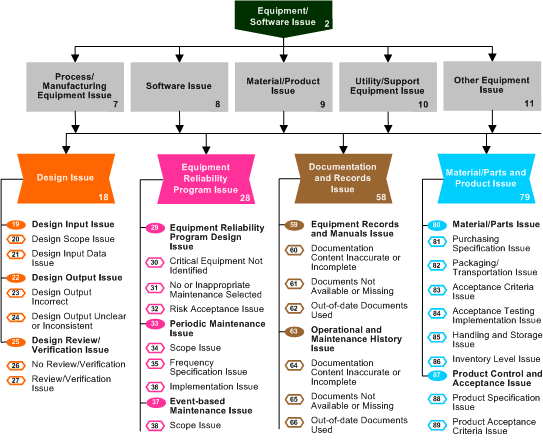
For most items, detailed information beyond "Definition/Typical Issues" is given. The categories of information include:
- Examples
- Potential recommendations
- Notes related to the use of the node
- Notes regarding commonly confused items/nodes
- Cross-reference to OSHA process safety management (PSM) elements (29 CFR 1910.119)
- Cross-reference to Risk Based Process Safety (RBPS) elements (a book written by ABS Consulting and published by the American Institute of Chemical Engineer's Center for Chemical Process Safety, ISBN 978-0-470-16569-0)
- Cross-reference to:
- Nodes on previous versions of the Root Cause Map™
- Nodes on the ABS Marine Root Cause Analysis Map™
The following graphic shows a portion of a page of this online documentation.
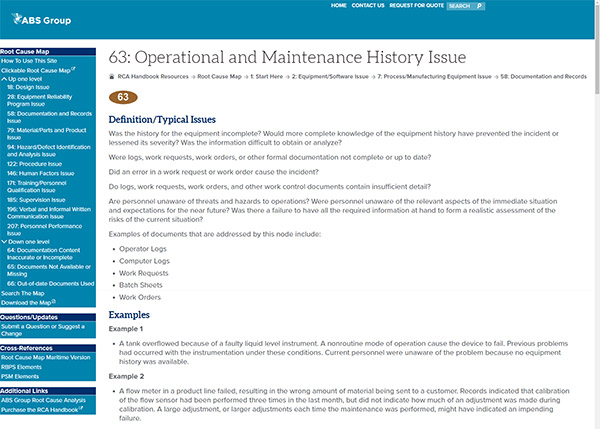
Using the Online Documentation
There are several ways to work with this online Root Cause Map™ documentation. The following graphic shows an example of the navigation box with Node 2, Equipment/Software Issue, selected.
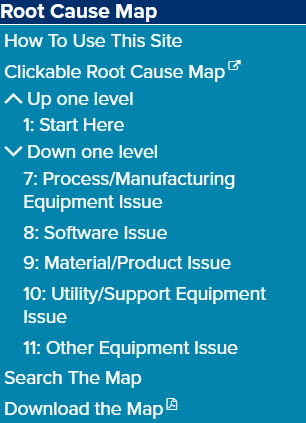
- The first choice is the "Clickable Root Cause Map." This will take you to a page that displays the entire Root Cause Map™ with the ability to click on each node and be taken to the documentation page for that node.
- The second and third options (detailed in the next section) allow you to work your way "Up One Level" or "Down One Level" as you make your choices of causal factor types, problem categories, etc. The navigation box will change to reflect your position in the Root Cause Map™. It will always show the nodes one level above and one level below the node for which you are currently displaying the documentation. If "Down One Level" does not appear, it means you have reached the end of that branch.
- The fourth option is to "Search The Map."
- "Download the Map" provides a PDF version of the Root Cause Map™.
Working Your Way Through the Root Cause Map™
Section 5 of the Root Cause Analysis Handbook describes the process for using the Root Cause Map™. Steps 1 and 2 do not involve the use of the Root Cause Map™.
Step 3 involves the coding of the root cause on the Root Cause Map™ using the following steps:
- For each causal factor, select the causal factor type (Equipment/Software Issue, Front-line Personnel Issue, External Factors, Acceptable Risk, or Cause Cannot Be Determined). Read the "Definition/Typical Issues" to determine the specific nature of the problem and determine the appropriate selection.
- Assuming that your causal factor type was either Equipment/Software Issue or Front-line Personnel Issue, you are now ready to find the problem category represented by a "rectangle" on the Root Cause Map™. The appropriate choices for the causal factor type you have chosen are displayed in the navigation box for the causal factor type under "Down One Level." Again, use the information found on the individual Web page for these problem categories to help make your selections.
- Once you have selected the problem category, you can move on to the choice of a major intermediate cause category. The 11 choices will appear in the navigation box under "Down One Level." As before, use the information about each one to help determine which is the appropriate choice.
- After the major intermediate cause category is selected, it is time to find the intermediate cause category (represented by an oval in the Root Cause Map™).
- Each intermediate cause category then leads to the selection of the intermediate cause (represented by a hexagon on the Root Cause Map™).
- From this point, all nodes (except those under Personnel Performance Issue; Individual Issue – see Special Considerations) will lead to node #224: Enter here with each intermediate cause.
Note: This is not an actual node, but simply an entry point to the root cause type nodes. - After selecting the root cause type, the final step is to select the root cause.
- Repeat this process until you have determined all of the root causes for each causal factor and item of note for the incident.
Note: It is typical that multiple paths through the Root Cause Map™ will be appropriate for each causal factor. See Section 5 of the Root Cause Analysis Handbook for examples of causal factors with multiple root causes.
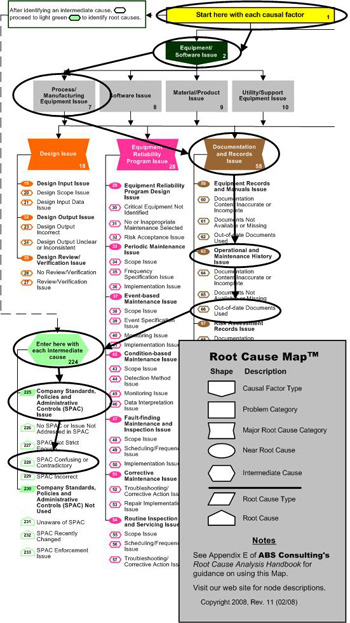 This graphic demonstrates how Root Cause Map™ node numbers correspond to the numbered nodes in the Root Cause Map™. The example shown is for the following Root Cause Map™ path:
- Equipment/Software Issue (2) – Causal factor type
- Process Manufacturing Equipment Issue (7) – Problem category
- Documentation and Records Issue (58) – Major intermediate cause category
- Operational and Maintenance History Issue (63) – Intermediate cause category
- Out-of-date Documents Used (66) – Intermediate cause
- Company Standards, Policies, and Administrative Controls (SPAC) Issue (225) – Root cause type
- SPAC Confusing or Contradictory (228) – Root cause
Further guidance on using any of these nodes can be found on this Web site by referring to the appropriate node number (e.g., node 58 for Documentation and Records Issue).
Special Considerations
Some of the branches on the Root Cause Map™ do not end in a hexagon. Examples include Natural Phenomena (15), External Events (16), and External Sabotage and Other Criminal Activity (17) and the items under Personnel Performance Issue; Individual Issue. Identification of root causes for these items is not anticipated because these issues are generally outside the control of the organization. In each of these situations, other paths through the Root Cause Map™ should be identified that are related to issues that the organization can control.